What it is
I built Fluxo for Brazilian companies still running their books off a bank statement and a spreadsheet. It's a financial control platform: import an OFX statement from any bank, or bring transactions in from Excel, and get one dashboard for revenue, expenses, results, and a simplified DRE, updated as the data comes in.
Getting started
It's built to go from zero to a working dashboard in a few minutes, not a setup project:
- Import your statements. Drag in an
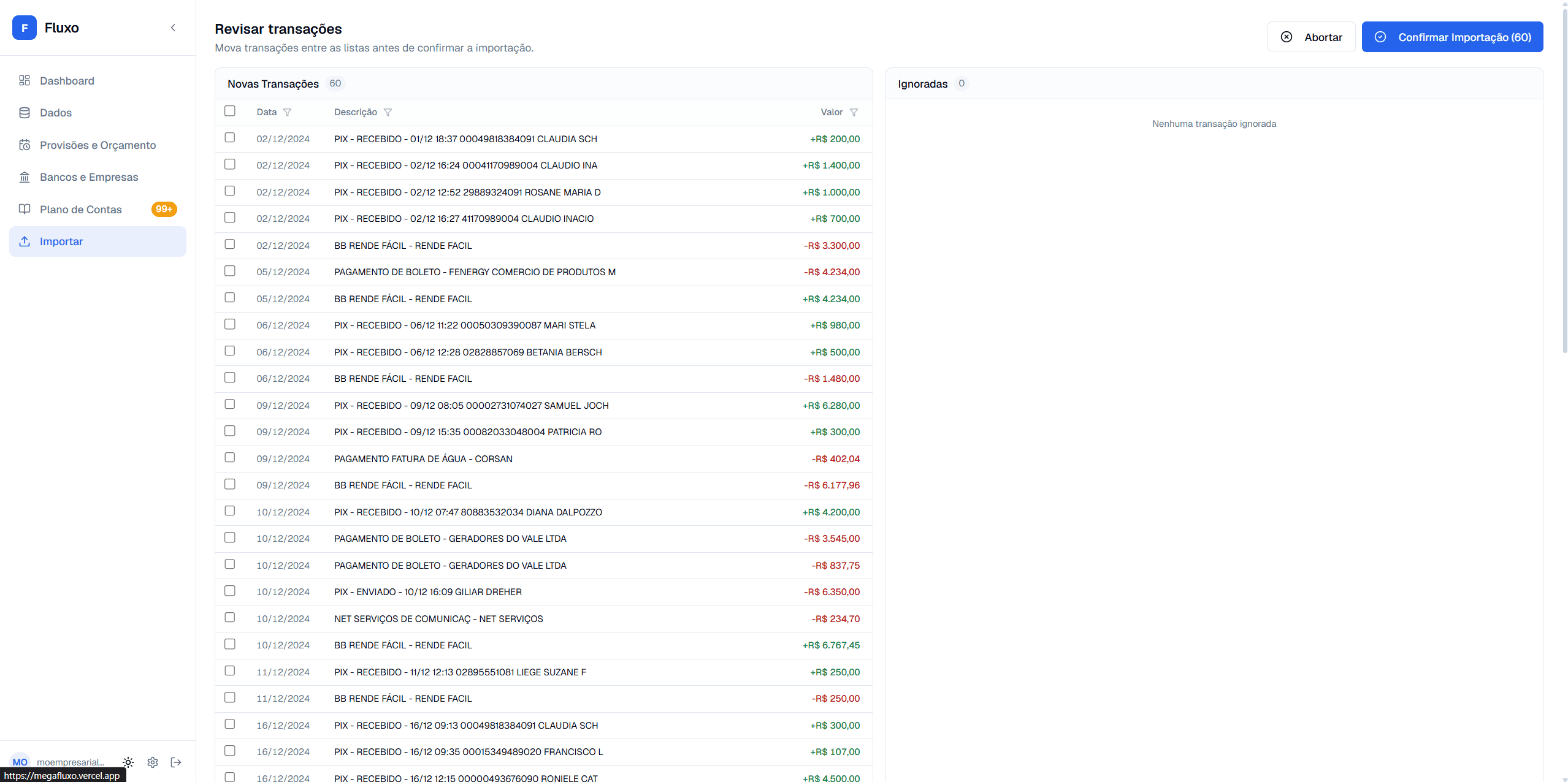
.ofxfile from any bank, or register entries manually and bring the rest in from an Excel sheet. - AI categorizes automatically. An LLM and your own classification rules sort each transaction into your chart of accounts. You only review what you actually want to check.
- Analyze and export. The dashboard gives you charts and comparatives immediately, and everything exports to CSV, Excel, or PDF whenever you need it.
No installation, no maintenance window, and it works from any device. Signup takes about a minute, and importing the first statement takes seconds.
What it does
Import, without the manual reconciliation. Drag in an OFX export from any Brazilian bank, or bring transactions in from a spreadsheet if that's what you already have on hand. Transfers between your own accounts get detected and deduplicated automatically, so moving money from checking to savings doesn't get double-counted as two separate transactions. Re-importing the same statement twice is safe too, duplicates are caught and skipped.
AI categorization that gets better. Every transaction gets classified against your chart of accounts as it lands. Correct one manually and it remembers the pattern, so the same recurring charge or the same client's incoming payment doesn't need re-tagging next month. Anyone who wants explicit control instead of leaving it to the model can set custom rules on top, scoped to a specific bank, company, or company group if needed.
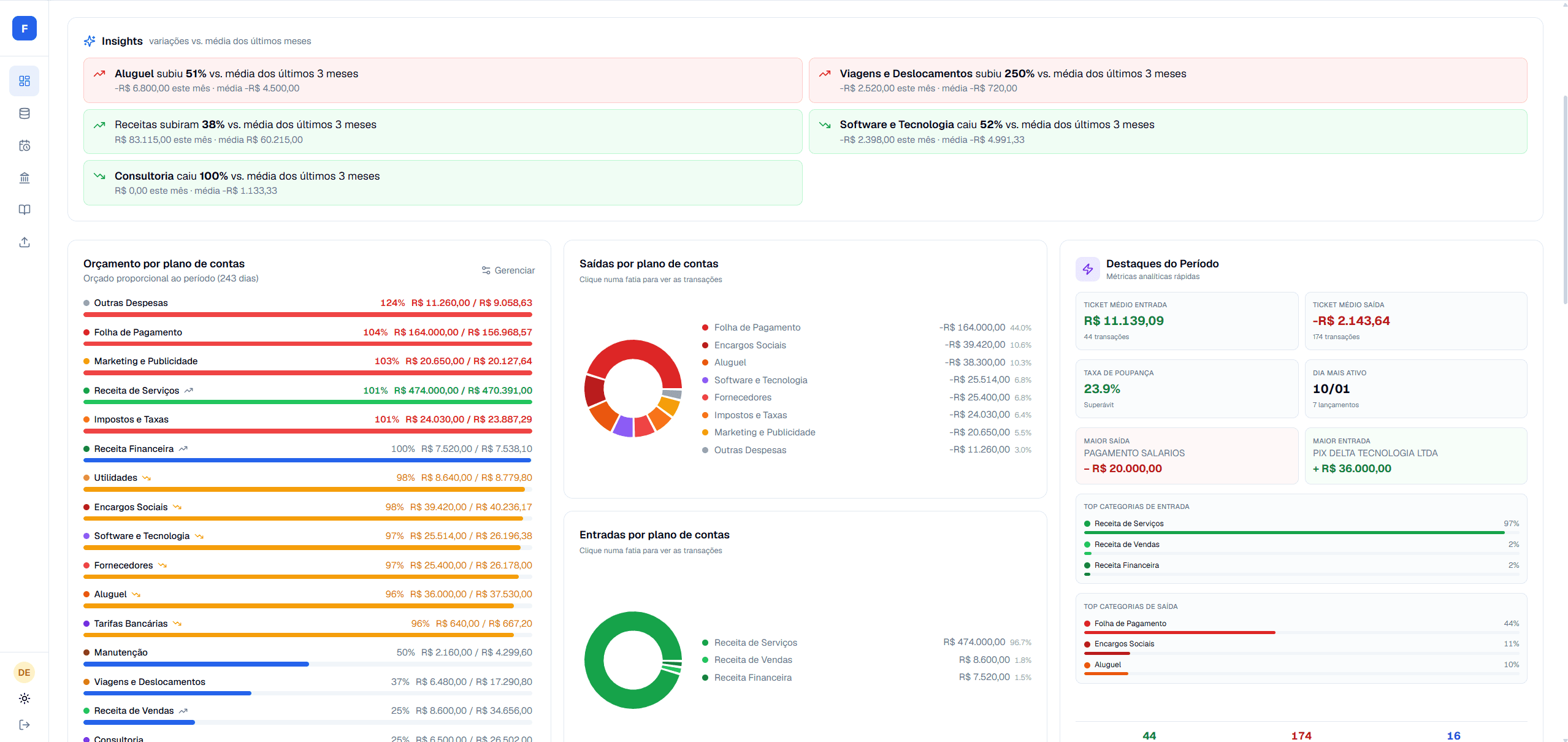
An actual analytical dashboard. KPIs with trend for revenue, expenses, and result, a revenue-versus-expenses chart across the last six months, a breakdown of the top expense categories by share of spend, and a simplified DRE. All on one page, instead of stitched together from separate exports.
A chart of accounts that isn't a flat list. Categories are hierarchical, can be scoped to specific company groups, and come with classification rules attached, so a rule you set once for "Aluguel" keeps applying as new statements come in.
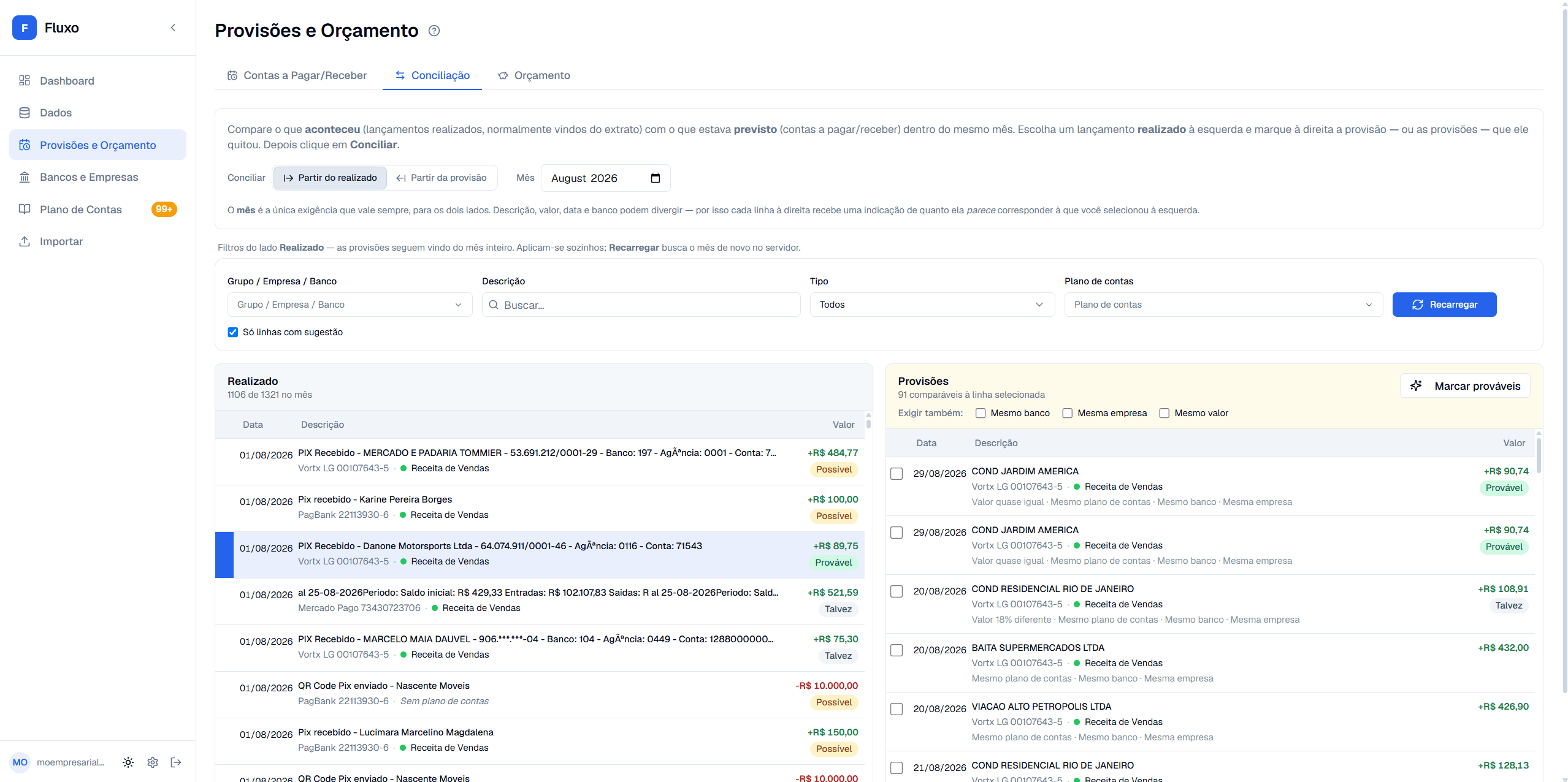
Provisions, budget, and reconciliation, tied together. Log what's expected to come in or go out before it happens, whether that's a recurring bill or an installment plan. Build an annual budget per company, month by month, and compare it against what actually happened. And when the real statement lands, a dedicated reconciliation screen matches realized transactions against what was provisioned, scored automatically on value, date, description, bank, and account, so the same bill doesn't sit counted twice: once as a forecast, once as an actual.
Multi-company, multi-bank, multi-user. One login manages several companies and several linked bank accounts at once, built for anyone running more than one business, or an accounting firm handling several clients from a single account. Invite people onto the account with a role: owner, editor, or read-only viewer, and restrict a given teammate to only the company groups they should actually see.
Manual entries and export. Anything that never touches a bank statement gets logged by hand. Everything, imported or manual, exports to CSV, Excel, or PDF.
Handling financial data specifically
This isn't a generic dashboard tool, it's built around people uploading real bank statements, so the isolation matters more than usual. Every account's data is scoped with row-level security at the database: nothing is shared or readable across accounts, and none of it is ever used to train a model. All communication is encrypted, banking information is never exposed to a third party without authorization, and the platform follows LGPD, with a public privacy policy and terms of use covering exactly what's collected and why.
What the demo shows
There's a full demo running on a fictional company's data, no signup required. It's not a stripped-down preview, it's the real dashboard, and it stays current: the underlying data shifts forward automatically so it always reflects the current month instead of going stale. Right now that means August revenue of R$83,115 against expenses of R$47,043, a result of R$36,072, and a transaction feed with entries like a CDB yield, a couple of bank maintenance fees, a client trip, and a DAS tax payment, each already categorized and sitting in the right place on the expense breakdown.
Or skip the demo and create a free account, 14 days, no card required:
Plans
| Plan | Price | Highlights |
|---|---|---|
| Trial | Free, 14 days | Up to 2,000 transactions/month, full dashboard and reports, no card required |
| Starter | R$79.90/mo | Up to 600 transactions/month, rule-based categorization |
| Pro | R$199.90/mo | Up to 5,000 transactions/month, AI categorization, 10 users/10 companies |
| Business | R$1,490/mo | Unlimited transactions, 50 users/50 companies, built for accounting firms |
No long-term commitment on any plan, cancel whenever. Payments are processed through Asaas.